Showing posts with label realsense. Show all posts

Thursday, January 21, 2021

Capturing a YUV4:2:2 pixel format image from the USB port, and displaying it as RGB.

 I'm troubleshooting why I can't receive the RGB data stream from the Framos Realsense D435e.  I decided to take a step back to the Intel Realsense D435 USB, and verify the pixel format of the data stream.  


The Realsense software indicates there are multiple RGB camera stream formats:  YUYV, RGB8, RGBA8, etc.


Each of these streams should use a pixel format that is different from the others.  The data in the communication packet should be arranged based on the pixel format.  YUYV is a 16 bit per pixel format that contains the Luminance (brightness) of every pixel, and only half of the Chroma (color) data for each pixel.  The rest of the Chroma data is supplied in the next pixel. So when using YUYV you need to get pixel pairs.  And to make things a little more complicated, you need to convert the YUYV data to RGB data before you get the full color image.  

But the goal of the test was to see what pixel formats can come from the camera.  Turn out, even though there are multiple formats listed, the data in the packet is still only YUYV.   Selecting RGBA8 should require more bytes per pixel, and they should be in a different pixel format, but the data packets all look the same as YUYV. 

I discovered this using Wireshark's USBPcap feature.  The length of the image frame packets did not change when a different stream was selected.


WireShark reports that the image data packet is 115475 bytes long.  I exported the data by right clicking the hex and selecting "Copy as Escaped string", then pasting into notepad.  


The actual image data starts at 0x0113 or 275 bytes into the data packet.

There are 27 bytes of USB packet data, followed by 248 bytes of image header data.  I did not find a way of deciphering this image data header.  I'm sure it's in a standard out there somewhere, but ain't nobody got time for that.  I just calculated the number of bytes that I should get based on 320 x 180 pixels, and 2 bytes per pixel (115200 bytes)  So 115475 - 115200 = 275 should be the start.  And it is!

The YUV format is YUYV 4:2:2  (also this might be called YUY2).

A Microsoft developer doc describes the byte array as:  

Y0U0 Y1V0  Y2U1 Y3V1   ... where there is a Y byte for every pixel, and a 'U' (Chroma blue or Cb) byte for the first (odd) pixels, followed by a 'V' (Chroma red or Cr) byte for the second (even) pixels.

To convert YUV to RGB the YUV4:2:2 is converted to YUV4:4:4 first.  That just means you need Y U and V bytes for every pixel.  If a pixel is missing V, just copy the V from the next even number pixel. If it is missing a U, just copy the U value from the previous pixel. 

Then do some math, maybe with floating point numbers like this:

Make new variables C D & E

C = Y - 16

D = U - 128

E = V - 128

the formulas to convert YUV to RGB is:

R = clip( round( 1.164383 * C                   + 1.596027 * E  ) )

G = clip( round( 1.164383 * C - (0.391762 * D) - (0.812968 * E) ) )

B = clip( round( 1.164383 * C +  2.017232 * D                   ) )

*Clip just means limit the result back to a value from 0 to 255.  You can cast to an unsigned 8bit number to do this.

And here is the result in all it's amazing techno color:


What's up with the green box?  Well just ignore that.  Wire shark only captures 65535 bytes per packet.


Here are the intermediate steps:

Get the Luma Y and Chroma Cb Cr channels for all pixels:

Luma

Chroma Cb


Chroma Cr


Using the algorithm above, convert the pixels to R G B channels.
R


G


B


Friday, November 20, 2020

Rotating a point using Quaternions

 The RealSense tracking camera T265 outputs rotation as a quaternion, and translation as a vector.

 This is all the background needed to understand point rotation using quaternions   p' = qpq'

Format of a quaternion q:

The quaternion format displayed is [x,y,z,w], where x,y,z is the vector portion and w is the scalar.

For clarity, lets use this notation to talk about quaternions [qw, qx, qy, qz]. 

Where the realsense quaternion output is just re-ordered and re-labeled.  w is now qw, x is now qx, y is now qy and z is now qz.

qw contains the information about the amount of rotation around the axis contained in qx, qy, qz.

BUT THIS IS IMPORTANT:  

qx, qy, qz is not directly the vector of rotation.

qw = cos( angle of rotation / 2)

qx = sin( angle of rotation / 2)  * the x component of the vector of rotation.

qy = sin( angle of rotation / 2)  * the y component of the vector of rotation.

qz = sin( angle of rotation / 2)  * the z component of the vector of rotation.

Finding Angle of rotation and axis of rotation vector

If you want to find the angle of rotation around the axis vector calculate the arccosine of qw and multiply by 2:

angle of rotation =  2 * (arccos (qw))  

To find the vector that is the axis of rotation qx, qy, and qz must be divided by the sin(angle of rotation/2)

axis vector x component = qx /  sin( angle of rotation / 2)

axis vector y component = qy /  sin( angle of rotation / 2)

axis vector z component = qz /  sin( angle of rotation / 2)


Conjugate quaternion q'

 Rotating the same angle around the opposite vector reverses the rotation.  The vector is simply multiplied by -1.  This is considered the conjugate because the sign of the axis vector components are all reversed.  The conjugate quaternion is needed to flip the quaternion frame of reference when a quaternion is used to rotate a point in space.  The angle of rotation does not change, only the vector is inverted.

To create a conjugate quaternion do the following

qw' = conjugate qw = qw = cos( angle of rotation / 2)

qx' = conjugate qx =  -1 * sin( angle of rotation / 2)  * the x component of the vector of rotation.

qy' = conjugate qy =  -1 * sin( angle of rotation / 2)  * the y component of the vector of rotation.

qz' = conjugate qz =  -1 * sin( angle of rotation / 2)  * the z component of the vector of rotation.


Convert the point to a quaternion  p

 A point can be represented as a vector.  We will use px, py, pz as our point notation.  To create a quaternion from the point just add pw with a value of zero.  But remember that has to be equal to the cosine of the rotation divided by 2.  The arccos(0) = 90 degrees. Multiplied by 2 means the rotation of the point around itself is180 degrees.  [It's confusing I know.  It's all about getting out of a 4D rotation.]

The axis vector of rotation is the point px, py, pz.  That is multiplied by the sine of 180/2.  That ends up being the sine of 90 degrees which equals1.   

point quaternion pw = 0 = cos (180/2) = cos (90) = 0

point quaternion px = px * sin (180/2) = px * sin(90) = px * 1 = px

point quaternion py = py * sin (180/2) = py * sin(90) = py * 1 = py

point quaternion pz = pz * sin (180/2) = pz * sin(90) = pz * 1 = pz


The new point location p'

 To calculate the quaternion rotated location of a point use the formula [NOTE: using quaternion multiplication]

p' = qpq' 

 The order of operation is quaternion p multiplied with q'.  The resulting quaternion m is multiplied by q' to create p'.       m = pq'   and then p' = qm

The values in px', py', and pz' are the rotated x,y,z of the point.

px' = new point location x

py' = new point location y

pz' = new point location z


Quaternion multiplication 

 A quaternion is also written as (qw + qxi + qyj + qzk), where i,j,k represent square root of -1 along 3 complex (imaginary number) axes.  I'm ignoring the 4D complex stuff here because it confused me for a long time.  Lets just look at what happens if you multiply using this format:

(pw + pxi + pyj + pzk) (qw + qxi + qyj + qzk) = 

pw*qw + pw*qxi + pw*qyj + pw*qzk + px*qwi - px*qx + px*qyk - px*qzj + py*qwj - py*qxk - py*qy + py*qzi + pz*qwk + pz*qxj - pz*qyi - pz*qz


= (pw*qw - px*qx - py*qy - pz*qz) + (pw*qx + px*qw + py*qz - pz*qy)i + (pw*qy - px*qz + py*qw + pz*qx)j + (pw*qz + px*qy - py*qx + pz*qw)k

 Multiplication is distributive, and there is a multiplication table for i*j*k = -1 (see blow).

The resulting quaternion product of this multiplication is:  

[Note: I decided to call this quaternion m]

mw = (pw*qw - px*qx - py*qy - pz*qz)

mx = (pw*qx + px*qw + py*qz - pz*qy)

my = (pw*qy - px*qz + py*qw + pz*qx)

mz = (pw*qz + px*qy - py*qx + pz*qw)


i*j*k = -1

The multiplication table for i j k

1 i j k

1 1 i j k

i i −1 k −j

j j −k −1 i

k k j −i −1


https://en.wikipedia.org/wiki/Quaternion


Donate


Sunday, February 2, 2020

Intel Realsense T265 Quaternion considerations

It has taken me a while to figure out how to use the camera pose data sent from the T265.
The Intel Realsense T265 pose a combination of a quaternion and translation vector.

Lets define some things:
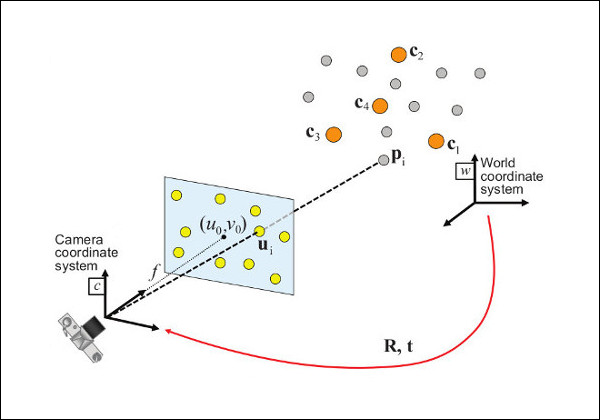
  Camera Pose: the location and orientation of the camera in space.  Relative to the world coordinates.
https://docs.opencv.org/master/dc/d2c/tutorial_real_time_pose.html

  Quaternion: A 4D representation of 3D rotation and/or orientation.  Useful because quaternion math is faster than matrix algebra and does not have gimbal lock error.  There are multiple ways of representing a quaternion.
different ways of writing a quaternion.  Image credit Wikepedia.
All of them are derived from rotating around a vector.  (i.e. rotating theta radians around vector v)
All quaternion represntations have a real number and 3 complex number.  The real number is the cosine (rotation angle/2).  The complex values are the sine (rotation angle /2) multiplied by the vector defining the axis of rotation in x,y, and z.  The three values scale complex values i, j, and k respectively.  - Look, it's a complicated thing to get you mind around, that's why it took me about a year to understand (well.. and I ain't that smart anyhow).  It's funny, I kind of sense (or even feel) an interpretation of a matrix, but not a quaternion. I think it's the 1/2 angle that gets me.  And double coverage is weird. You can get the same rotation by going in different directions ( think -180 and 180 degrees).  Make sure you check out item #6 below for help visualizing quaternions.

  Translation vector: a 3D value representing the direction and magnitude in X, Y, Z coordinates that an object (camera) has moved.

  Rotation matrix: A 3x3 set of numbers that represents where the unit vectors for +x, +y, and +z axes will be located in world coordinates, as long as they start at the origin 0,0,0 (and have length equal to 1).

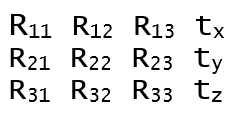
  R|t matrix: A 4 x 3 matrix made up of the Rotation matrix and the translation vector.  The camera pose can be represented as an R|t matrix.  The quaternion must be converted to the R matrix.
R|t matrix (used as camera pose matrix)
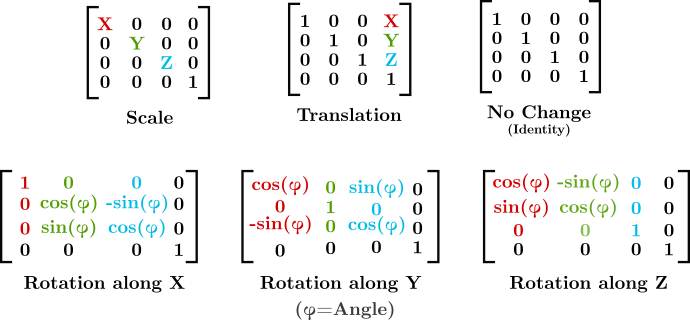
In practice,you want to turn this into a 4x4 homogeneous matrix where the
bottom row = 0 0 0 1
That allows square matrices to be multiplied together.  
Some of the types of 4x4 homogeneous matrices that can be combined by matrix multiplication.
https://sinestesia.co/blog/tutorials/python-cube-matrices/

  Essential Matrix: Not to confuse things too much, but the R|t matrix can be defined as a 3 x 3 matrix called the essential matrix. It is not used in this blog post.  I just wanted to drop a note about it.  It is typically used to find the 3D point correspondence from two camera poses.  The essential matrix associates a 2D point in an image with a line that exists in both camera images.  However, to create the essential matrix the 3 x 3 Rotation matrix is multiplied by the Skew Symmetric form of the translation vector t.  You can retrieve R and t from the essential matrix.  Check the Wikipedia page for Essential matrix.  Look at the section "Determining R and t from E".

--

I started to use the Intel Realsense cameras while at the same time learning linear algebra.  Because I didn't know about the advantages that quaternions have when interpolating movement, I continued down the matrix path.   That meant the quaternion pose data needed to be converted to a rotation matrix.  Wikipedia has an article, but I found some code examples that allowed me to convert a quaternion to a rotation matrix, and a rotation matrix to a quaternion.  There were, of course, errros.  some were mine, and some were documentation.


The key shortcuts I needed are outlined here:

1) The T265 Pose axes are not in the same orientation as the D435.
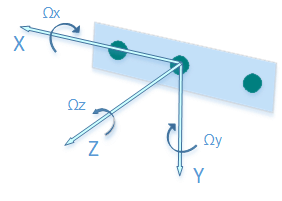
D435 Pose axes

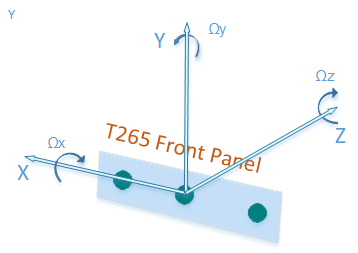
T265 pose axes


T265 Z and Y axis are rotated around x axis (in relation to the D435)
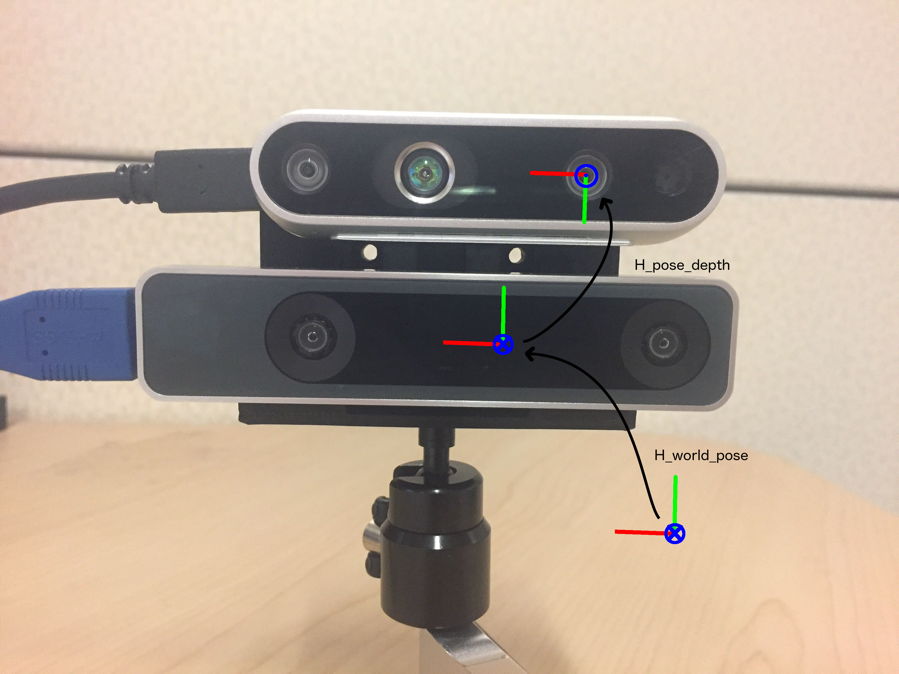
D435 above a T265.  Y axis revered, Z axis revered. X axis aligned.
You need an R|t matrix to get from T265 pose data to D435 pose.


2) The Quaternion value displayed is not in the order that most quaternion explanations use.  Most use the format where the real value is on the left, followed by the i, j, k complex valued to the right of the real.  The Realsense viewer places the real value on the right.
Realsense quaternions are displayed [x,y,z,w].  The display does not label the elements.
Most formulas would be formatted as [w,x,y,z], or  a+bi+cj+dk or qr, qx,qy,qz.  In all those cases the real is on the left, complex on right. 

3)  The T265 camera orients itself to gravity.  It decides where up is, then once it has a valid pose, it projects that x and z axes on the ground plane.  That's how it defines its world coordinates.


4) If you want to convert the quaternion to a Rotation matrix take a look at this site
https://www.euclideanspace.com/maths/geometry/rotations/conversions/quaternionToMatrix/index.htm  - But caution... There are errors in thier code.

or try Quaternion Derived rotation matrix on wikipedia, its just, um, Wikipedia, so you might need a masters degree to understand it.

Here is a link to my LabView code that will convert the quaternion to a rotation matrix
https://drive.google.com/drive/folders/1rJ3j662i-Naq2tXvlYXebeRyU57GD1RZ?usp=sharing
If you use it, you to take all the blame and give me all the credit.  And if you make something that is a financial success cut me in on the money.
oh boy, math.  that's fun.


5)  It is not easy to "see" how the quaternion converts to a rotation matrix.
  Here are some quaternion to rotation matrix examples


6) Have a look at the 3 blue one brown collaboration with eater.net to Visualize Quaternions
It is the most helpful thing on the internet regarding quaternions.