Showing posts with label basler. Show all posts

Thursday, April 30, 2020

Thermal / Visible fusion with Omron MEMS temperature sensor and Basler Dart


Omron uses Micro-ElectoMechanical System (MEMS) thermopile to measure temperature at a distance.  The D6T series sensors use the thermoelectric effect (Seebeck effect) in which temperature is converted directly to voltage.  They are sensitive to Longware Infrared (LWIR) at wavelength between 8 and 12 micrometers.


 The sensors are intended to detect human presence in a volume the size of a room.  The optics are fixed, and the angular field of view is wide.  The highest resolution sensor, 32 x 32 pixels has a 90 degree angular field of view.  A reasonable human size field of view (1550 mm x 1550 mm) requires a short working distance of 800 mm.
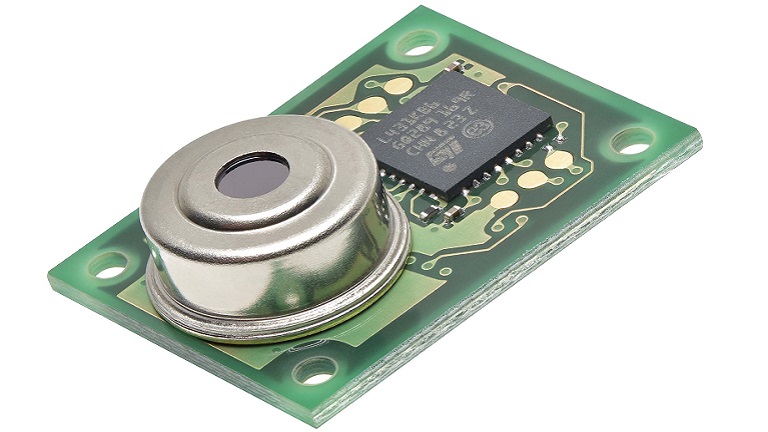


Omron D6T-32L-01A specs
Price $125
Resolution 32 x 32 pixels (1024 total pixels)
Power supply voltage 4.5 to 5.5 VDC
Current consumption: 19 mA
Accuracy: +- 3 degrees C in the center 16 pixels.
Temperature resolution 0.33 degrees C
Communication format: I2C

Omron example image 32 x 32 pixels.


  To get usable detail in the visible spectrum I would recommend narrowing the angular field of view.  An inexpensive USB camera that is <GenICam> complaint is the Basler dart daA1280-54uc (S-Mount).

Paired with an f4.2 mm focal length s-mount lens (with IR cut filter), the 800 mm working distance gives a 685 x 915 mm field of view.  But the camera needs to be rotated on its side.

The resulting field of view with both the Omron and the Basler sitting next to each other:
Thermal 1572 x 1572 mm @ 49.125 mm/pixel
Visible 685 x 915 mm @ 0.714 mm/pixel


Wednesday, April 8, 2020

Save camera settings to the camera via Basler Pylon


If a Basler Ace loses power it will lose any changed settings.  Saving the settings in the camera is not easy to figure out.  The video describes the problem, and shows how to use Basler Pylon software to save the settings in the camera.

Save Camera Settings via Basler Pylon

The camera can store all of it's settings for up to three users.  The default user settings, called "User Set 1", are loaded when the camera powers up.  Saving the settings to "User Set 1" is not available unless the software is in "Guru" mode.

Here are the steps you need to follow to save the settings in the camera.
1) Connect to the camera
2) If the feature window is not open, click the "View|Features [cameraname]" menu
3) At the bottom of the feature window, select "User Level : Guru"
4) Access the camera's features by expanding the list.  Click on the "> cameraname" to expand the features.
5) Change the features as needed.  Exposure is in Acquisition control, gain is in Analog control.
6)  Save the to the camera, scroll down and expand "> Configuration Sets".
7) Change "Configuration Set Selector" to "User Set 1"
8) Click the "User Set Save" "Execute" button
9) Change "Default Startup Set" to "User Set 1"
illustration for step 2) open the feature window


illustration step 3) change to Guru

illustration step 4) expand list for the camera


illustration step 5) edit features

illustration steps 6 - 9)

Basler Pylon software download link: https://www.baslerweb.com/en/products/software/